Distributed Data Parallel (DDP)
Data Parallel is the most common distributed training strategy and usually the first one you should try when scaling up your training workflows. The idea is simple: every GPU has a complete copy of the full model, but each processes a different slice of the data, because data doesn't fit on one GPU or training is too slow.
PyTorch DistributedDataParallel (DDP) is the standard implementation of this strategy.
DDP works by running one process per GPU, where:
- Each process has its own full copy of the model
- Each process computes forward and backward passes on its own batch (shard) of data
- Gradients are averaged across all processes using an efficient collective communication operation called all-reduce after each backward pass, ensuring that all model replicas remain in sync.
DDP is PyTorch's recommended approach and easiest to implement for multi-GPU training and works across both single-node and multi-node setups.
what is all-reduce?
all-reduce is a collective communication operation that takes tensors from all processes, performs a reduction (e.g., sum) across them, and then distributes the result back to all processes. In DDP, it's used to average gradients across GPUs after the backward pass, ensuring that each model replica has the same updated parameters before the next optimization step. Read more about all-reduce in the PyTorch Collective Communication chapter.
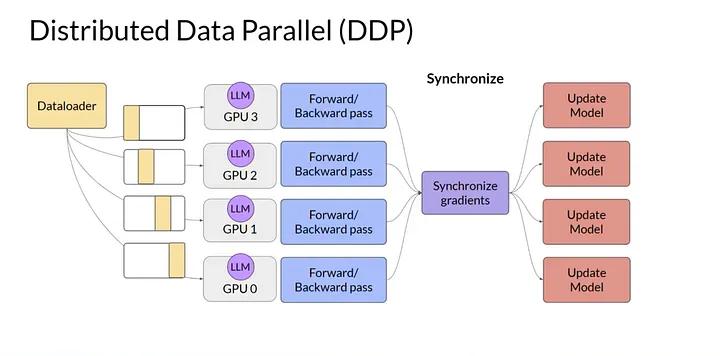 Figure 1: DDP replicates the full model on each GPU and averages gradients across GPUs after backward pass (Image from Medium)
How DDP Works?
- Model Replication: Each GPU gets a full copy of the model
- Data Distribution: Training data is split across GPUs using
DistributedSamplerto ensure each GPU processes a unique subset of the data - Forward Pass: Each GPU processes its batch independently
- Gradient Sync: During backward propagation, gradients are averaged across all GPUs using
all-reduceoperation (typically via NCCL backend for GPUs) - Parameter Update: All GPUs update their parameters and after synchronization, each model replica remains identical.
Each GPU computes gradients independently, then participates in an all-reduce operation to ensure all model replicas remain identical before the next optimization step.
How to modify your training script for DDP?
There are only a few changes needed to convert a single-GPU training script to DDP.
The main steps are:
1. Initialize the distributed process group
2. Set the device for each process using local_rank
3. Wrap your model with DistributedDataParallel
4. Use DistributedSampler for your dataset to ensure proper data sharding
5. Set the epoch on the sampler at the start of each epoch to ensure different shuffling each epoch.
6. Keep the training loop the same (zero_grad → forward → backward → step)
7. Clean up the process group at the end of training.
1. Initialize the process group:
Each DDP process needs to initialize the process group for communication. This is typically done at the start of your script:
Tip
The launcher (e.g., torchrun) will set LOCAL_RANK, WORLD_RANK and WORLD_SIZE to a unique value for each process, allowing you to assign each process to a different GPU. For example, if you have 4 GPUs, the processes will have LOCAL_RANK values of 0, 1, 2, and 3, which correspond to the GPU IDs.
Using MPI-based launchers
The utility functions in utils/distributed.py can help with this setup and also provides a setup_distributed() function that initializes the process group and sets the device for you based on the environment variables with different launchers (e.g., torchrun, mpiexec, etc.). You can call this function at the start of your training script to handle the distributed setup.
see the scripts in scripts/01_data_parallel_ddp/ for examples of how to use MPI-based launchers with PyTorch DDP.
2. Set the device for each process:
Each process should set its device based on the LOCAL_RANK environment variable, which is automatically set by the launcher:
3. Wrap your model with DistributedDataParallel:
The DDP wrapper automatically synchronizes gradients across all GPUs during the backward pass. Move the model to the device before wrapping.
from torch.nn.parallel import DistributedDataParallel as DDP
model = model.to(LOCAL_RANK)
model = DDP(model, device_ids=[LOCAL_RANK])
4. Use DistributedSampler for your dataset:
To ensure that each GPU processes a unique subset of the data, use DistributedSampler, which partitions the dataset across the GPUs.
from torch.utils.data.distributed import DistributedSampler
train_loader = DataLoader(
        train_dataset,
        sampler=DistributedSampler(train_dataset),
        batch_size=batch_size,
        shuffle=False,                          # shuffle is handled by the sampler
        pin_memory=True,
        ...)
DistributedSampler
The DistributedSampler ensures each GPU sees a non-overlapping
subset of the data:
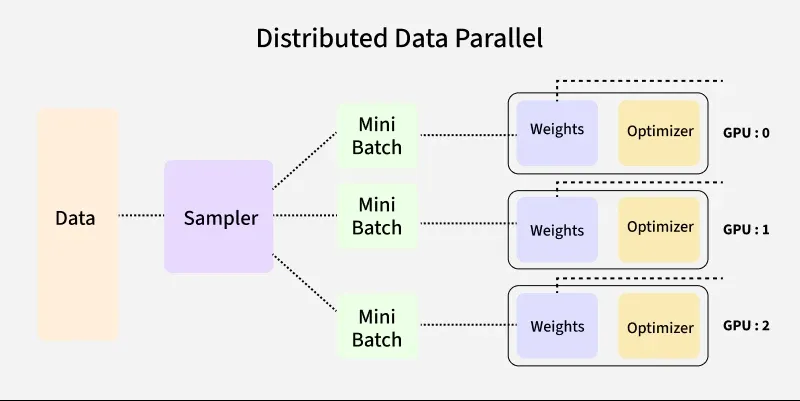
Two important details when using DistributedSampler:
- Set
shuffle=Falsein DataLoader — the sampler handles shuffling by setting the epoch, so you don't want the DataLoader to shuffle as well. - Call
sampler.set_epoch(epoch)at the start of each epoch. Without this, every epoch uses the same shuffle order, which hurts convergence.
5. Destroy the process group at the end of training:
Destroy the process group to clean up resources:
Effective Batch Size
With DDP, each GPU processes batch_size samples per step. The effective batch size is:
If you use batch_size=64 on 1 GPU, then on 4 GPUs, your effective batch size is 256.
This matters for learning rate scheduling — you may need to scale the learning rate accordingly (linear scaling rule: lr × world_size).
Common Pitfalls
Printing on all ranks
Without guarding print statements, you get 4 copies of every log line:
# Bad: prints on all GPUs
print(f"Loss: {loss.item()}")

# Good: only rank 0 prints
if dist.get_rank() == 0:
    print(f"Loss: {loss.item()}")
Forgetting set_epoch()
The DistributedSampler shuffles data differently each epoch based on the epoch number. If you forget to call set_epoch(), every epoch will have the same shuffle order, which can hurt convergence:
# Bad: same data order every epoch
for epoch in range(num_epochs):
    for data, target in train_loader:
        ...

# Good: different shuffle each epoch
for epoch in range(num_epochs):
    train_sampler.set_epoch(epoch)
    for data, target in train_loader:
        ...
Saving checkpoints from all ranks
If every process saves a checkpoint, you will end up with duplicated files and potential corruption.
# Bad: every rank writes a checkpoint
torch.save(model.state_dict(), "checkpoint.pt")

# Good: only rank 0 writes
if dist.get_rank() == 0:
    torch.save(model.state_dict(), "checkpoint.pt")
Saving full model with DDP
The above example only saves the local state dict on each GPU, which is not the full model. To save the full model, you can use model.module.state_dict() to access the underlying model's state dict.
Manually sending tensors between GPUs
Not using pin_memory and non_blocking=True in your DataLoader can lead to slow data transfers between CPU and GPU. Always use these options for optimal performance.
train_loader = DataLoader(
    train_dataset,
    batch_size=batch_size,
    shuffle=True,
    pin_memory=True,
)

for data, target in train_loader:
    data = data.to(device, non_blocking=True)
    target = target.to(device, non_blocking=True)
Uneven batch sizes across GPUs
If the dataset size is not divisible by WORLD_SIZE, some ranks may receive fewer samples. This can lead to:
- Imbalanced workloads across GPUs
- Incorrect gradient averaging
- Potential hangs or errors in synchronization
Note
DistributedSampler handles this by default by either:
- Padding samples (default behavior) so that each rank has the same number of samples
- Dropping extra samples when drop_last=True
This ensures that all ranks process the same number of batches and stay in sync.
Info
PyTorch DataLoader documenation has more details on all knobs and options for DistributedSampler and how it handles shuffling, padding, and dropping samples.
DDP Best Practices
Here are some easy tips to get the best performance out of DDP:
- Use mixed precision (FP16/BF16) → faster + lower memory
- Keep GPUs busy → check utilization (
nvitopornvidia-smi) before scaling - Tune DataLoader
num_workers ≈ num_gpus × 4pin_memory=True,persistent_workers=True
- Use
DistributedSamplercorrectlyshuffle=Falsein DataLoader- call
sampler.set_epoch(epoch)
- Scale batch size with GPUs → adjust learning rate if needed
- Use NCCL + good network config for fast communication
- Log/checkpoint only on rank 0 to avoid duplication and corruption
When to Use DDP
Use DDP when:
- Your model fits on a single GPU with batch_size > 1 but training is too slow.
- You want to train faster by using more GPUs
- You want near-linear scaling with GPU count
Move beyond DDP when:
- Your model doesn't fit on a single GPU → Chapter 5 (FSDP)
- Individual layers are too large → Chapter 6 (TP)
- You have hundreds of layers → Chapter 7 (PP)
- Your input data is too large, even for batch_size=→ Chapter 10 (Domain Parallelism)
Running the Examples
# Single node, 4 GPUs
torchrun --standalone --nproc_per_node=4 \
    scripts/01_data_parallel_ddp/multinode_ddp_basic.py

# Multi-node (2 nodes, 4 GPUs each)
mpiexec -n 8 --ppn 4 --cpu-bind none \
    python scripts/01_data_parallel_ddp/multinode_ddp_basic.py

# DistributedSampler / DataLoader patterns
torchrun --standalone --nproc_per_node=4 \
    scripts/01_data_parallel_ddp/distributed_dataloader.py

# Multi-node via PBS job script
qsub scripts/01_data_parallel_ddp/torchrun_multigpu_ddp.sh
See also:
- scripts/01_data_parallel_ddp/README.md — full DDP guide with files, PBS instructions, and troubleshooting
- scripts/01_data_parallel_ddp/multinode_ddp_basic.py — minimal DDP example with synthetic data
- scripts/01_data_parallel_ddp/distributed_dataloader.py — DistributedSampler patterns
References
What's Next?
DDP requires every GPU to hold the full model. When that's no longer possible, FSDP shards the model itself across GPUs.